
Curved Arrows ↩ ↪: When to Use Them and What They Symbolize
By The Cool Symbol Team on 2026-07-05
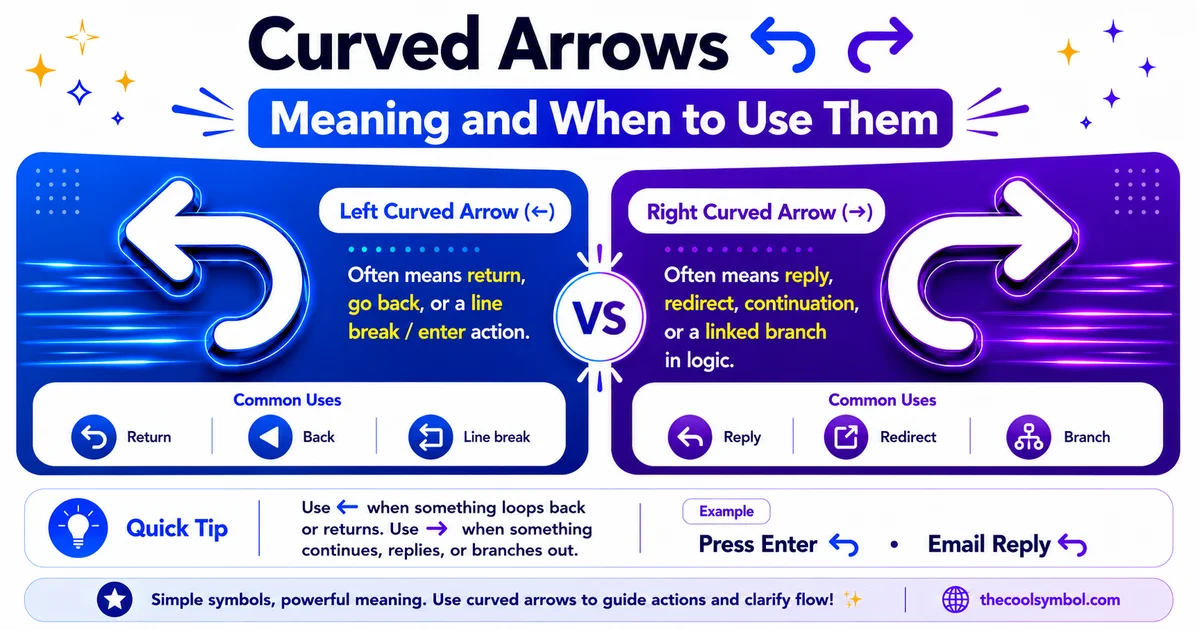
Straight arrows point somewhere. Curved arrows do something. That’s the whole difference in a nutshell.
A straight arrow says “go this way, forward, next.” A curved arrow says “come back, turn around, do it again, undo that.” The curve adds motion and intention that a straight line just can’t carry. It’s why the undo button, the refresh icon and the reply arrow all use curves, not straight lines.
There’s a whole family of them: hook arrows, return arrows, circular arrows, u-turn arrows. Each curve shape signals a slightly different action, so knowing which is which makes your writing, design and messaging clearer.
This guide breaks down what curved arrow symbols mean, the main types and their specific jobs, where you see them every day and when to reach for a curve instead of a straight arrow.
What curved arrows symbolize
Where straight arrows are about direction, curved arrows are about action and change of course. Their core meanings all share that theme.
- Return and go back (↩ the hook arrow, like the reply or back action)
- Forward and redo (↪ the reversed hook, like reply-all or redo)
- Refresh, reload and repeat (↻ ↺ the circular arrows)
- Undo and reverse an action (the counter-clockwise curve)
- U-turn, redirect and change direction (⤴ ⤵ the curved up and down arrows)
The common thread is motion that isn’t a straight line. A curved arrow implies the path bends, loops or comes back on itself. That makes it perfect for actions that reverse, repeat or redirect rather than simply move forward.
The main types of curved arrows
Each curved arrow shape has picked up its own specific meaning through use. Here are the ones you’ll actually encounter.
Hook arrows (↩ ↪)
The hook arrows are the ones that bend down and back like a fishing hook. The left hook (↩) is the classic return, reply or back symbol. You see it as the reply arrow in email and messaging apps, where it doubles as the symbol for the Enter or Return key on a keyboard. The right hook (↪) reverses that, standing for forward, reply-all or redo.
Circular arrows (↻ ↺)
Circular arrows form a loop, suggesting something that repeats or cycles. The clockwise arrow (↻) is the universal refresh or reload symbol, the one on every browser and app. The counter-clockwise version (↺) often means rotate back or reverse the rotation. Together they signal anything cyclical: refresh, repeat, sync, rotate.
Semicircle and return arrows (↶ ↷)
These arrows curve in a half-loop and are commonly tied to undo and redo. The counter-clockwise semicircle reads as undo, stepping back to reverse your last action. The clockwise one reads as redo, reapplying what you undid. There’s even a dedicated undo symbol in Unicode, a curved arrow pointing back, built specifically for this interface job.
U-turn arrows (⤴ ⤵)
The curved up and down arrows suggest a change of direction, like a road u-turn. The curving-up arrow can mean moving up and over to a new path, while the curving-down arrow suggests dropping down or redirecting below. These show up in flowcharts and diagrams to route a path around a corner.
Curved arrows and their meanings
Here’s the full set at a glance, matched to the action each one signals.
Notice how none of these simply point. Every one implies a movement that bends, loops or reverses. That’s what separates the curved family from the straight arrows.
Want to copy any of these curved arrow symbols or browse the full arrow set? Explore the complete arrow and symbol collection here →. Every curved, hooked and circular arrow, ready to copy and paste anywhere you type.
Curved arrows vs straight arrows: when to use which
The choice between a curved and a straight arrow isn’t decoration. It changes the meaning.
A straight arrow is about direction and forward motion. As the full guide to arrow symbols and their meanings explains, a straight right arrow says “next,” “go to” or “leads to.” It moves you along in one direction.
A curved arrow is about action and reversal. It says “come back,” “do it again,” “undo” or “turn around.” The moment the path bends, the meaning shifts from simple direction to a change of course.
This is a different kind of distinction than the one between single and double arrows in math and logic, where the number of lines changes the logical weight. With curved versus straight, it’s the shape of the path that carries the meaning: bent means return or repeat, straight means proceed.
So the rule is simple. Use a straight arrow when you’re pointing somewhere or moving forward. Use a curved arrow when the action loops back, repeats or changes direction.
Where you see curved arrows every day
Curved arrows are everywhere in interfaces and text, quietly doing specific jobs.
Undo and redo
Every text editor, design tool and word processor uses curved arrows for undo and redo. The counter-clockwise curve steps back, the clockwise curve steps forward again. This is probably the most common curved-arrow job on any screen.
Refresh and reload
The circular arrow is the universal refresh symbol. You tap it to reload a web page, sync an app or refresh a feed. Its loop shape says “go around again and come back with something new,” which is exactly what refreshing does.
Reply and forward in messaging
The hook arrows power email and messaging. The left hook is reply, curving the conversation back to the sender. The right hook or a similar curve is forward, sending it onward. These are so standard that the shape alone tells you the action.
The Enter and Return key
On many keyboards and in interface hints, the return hook arrow marks the Enter or Return key. It shows the cursor curving down and back to a new line, which is literally what pressing Return does to your text.
Flowcharts and diagrams
In flowcharts, curved and looping arrows show a process that repeats or a path that routes back to an earlier step. Where a straight arrow moves the flow forward, a curved one sends it back into a loop, which is essential for showing cycles.
Using curved arrows in text and social posts
Beyond interfaces, curved arrows have a place in casual text and social media, where they add a decorative, flowing feel that straight arrows lack.
- Pointing back to something: “read that again ↩”
- Showing a reply or throwback: “↪ replying to this”
- Decorative flourishes in bios and headings, where the curve looks softer than a hard straight line
- Signaling a loop or routine: “same thing every morning ↻”
In aesthetic bios especially, a soft curved arrow can act as a gentle pointer or divider. It sits in the same decorative toolkit as symbols like the heart symbol used to add warmth to a message, though the curved arrow leans practical and directional rather than emotional. It guides the eye instead of expressing a feeling.
A quick note on where these come from
All of these curved arrows are standard Unicode characters, which is why they copy and paste reliably across devices. According to the Unicode Arrows block documentation, the main arrows block was introduced back in Unicode 1.1 in 1993, and it includes the hook, semicircle and circular arrows alongside the straight ones.
Because they’re real text characters and not images, you can drop a curved arrow into a bio, a document, a message or a design and it renders the same way everywhere. That reliability is what makes them so useful for interface hints and quick text pointers alike.
3 common mistakes with curved arrows
1. Using a curved arrow when you mean simple direction
A curved arrow implies return, repeat or reversal. If you just want to point forward or show a next step, a straight arrow is clearer. Reserve the curve for when the action actually bends back or loops.
2. Mixing up clockwise and counter-clockwise
The direction of the loop matters. Clockwise usually means refresh or redo, counter-clockwise usually means undo or reverse. Using the wrong rotation can suggest the opposite action, so check which way the curve turns.
3. Confusing the reply hook with the Return key symbol
The same left hook arrow serves as both a reply symbol and the Enter or Return key marker. Context usually makes it clear, but in interface design, pair it with a label if there’s any chance of confusion between sending a reply and pressing Return.
Wrapping up
Curved arrows carry a language of action that straight arrows can’t. Where a straight arrow points, a curved arrow returns, repeats, undoes or redirects. The hook arrows handle reply and return, the circular arrows handle refresh and repeat, the semicircles handle undo and redo, while the u-turns handle changing direction.
The rule to remember is about the shape of the path. If the action moves straight forward, use a straight arrow. If it loops, bends or comes back, use a curve. That single instinct will guide you to the right arrow nearly every time.
Next time you tap undo, refresh a page or hit reply, look at the icon. That little curve is doing a very specific, very old job in the language of symbols.