
PUBG & BGMI Symbols ꧁★꧂: Copy and Paste Stylish Name Characters
By The Cool Symbol Team on 2026-09-20
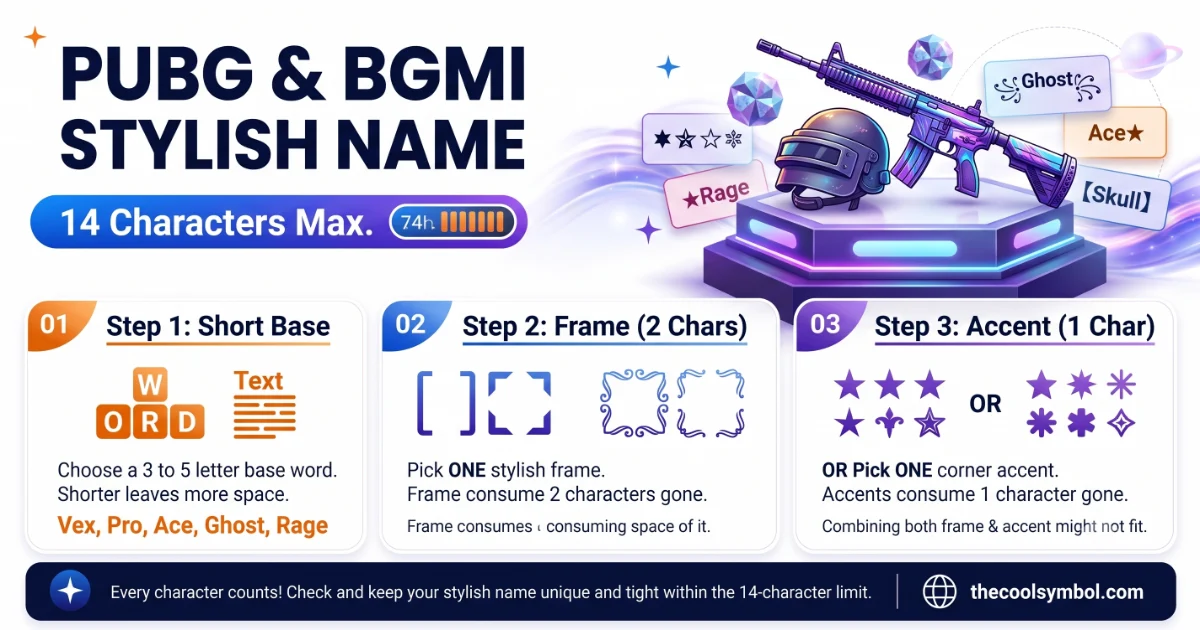
You’ve seen them in the lobby. A player name wrapped in sharp wings: ꧁★Viper★꧂. Or a clan tag with a crown: ♛Royal•Ace. These names stand out before the match even starts.
Those characters are PUBG symbols. They’re real Unicode text that you copy and paste into your display name. PUBG: Battlegrounds is one of the biggest games in the world, with hundreds of millions of players. With that many people, a plain name gets lost. Symbols make yours memorable.
But PUBG and BGMI have a strict rule that makes this harder than other games: you only get 14 to 15 characters for your whole name, including the symbols. Every character counts. One wrong symbol can waste your Rename Card.
In this guide you’ll find the most popular PUBG and BGMI symbols that actually work, the best name recipes, how to change your name step by step and the rules that keep you from wasting a Rename Card. Easy words, tested symbols.
Why PUBG names need symbols
PUBG and BGMI names show up in three places: the lobby, the kill feed and the results screen. A name with a sharp frame or a bold accent catches the eye in all three.
Symbols help in two big ways. First, they make your name look professional and competitive. A name like ꧁Hunter꧂ looks like a pro player. Second, they help you get a name that’s actually available. With millions of players, every basic name is taken. Adding a symbol creates a unique string that nobody else has.
BGMI (Battlegrounds Mobile India) uses the same system as PUBG Mobile, so the same symbols work in both. Whatever works in one game works in the other.
The symbols that actually work in PUBG
This is the most important section. PUBG uses its own built-in font, not your phone’s font. That means many Unicode characters that look fine on Instagram or WhatsApp will show up as blank boxes in PUBG.
The symbols below have been tested. They show up correctly in the game, in the kill feed and in friend requests.
Accent symbols (add one after your name)
- ★ (black star): The classic gaming accent, works everywhere
- ツ (katakana tsu): The sweaty smiley, shared with Fortnite culture
- 亗 (CJK character): Sharp and angular, popular for clan tags
- 彡 (CJK “hair”): Used as wings on both sides of a name
- 乂 (CJK cross): Frames a name with a clean X shape
- ⚡ (lightning bolt): Speed, power, aggression
- ☠ (skull): Danger, eliminations, dark style
- ♛ (black queen chess): Used as a crown for “king” names
- ☢ (biohazard): Toxic, danger zone feel
- ☬ (Adi Shakti): Very popular in South Asian PUBG community
- ༒ (Tibetan mark): Ornate accent, pro tournament look
Framing brackets (use as matching pairs)
- ꧁ ꧂ (Javanese brackets): THE most famous PUBG frame, the “wings”
- 『 』 (Japanese double brackets): Clean, sharp look
- 【 】 (lenticular brackets): Bold and wide
- ★彡 彡★ (star-wing combo): The classic sweaty wrapper
The 14-character rule
This is the biggest difference between PUBG and other games. Your entire display name, including every symbol, bracket and space, can only be 14 to 15 characters long.
That means a frame like ꧁ ꧂ already uses 2 of your characters. A star uses 1. So if your frame takes 2 and your accent takes 1, you only have 11 characters left for the actual name.
This is why the best PUBG names are short. A 4-letter base with a frame and one accent fits perfectly. A long name with lots of symbols won’t fit and will get rejected.
The PUBG name recipe
Here’s the formula that pro players use.
The key difference from other games: in PUBG, you usually pick a frame OR an accent, not both. The 14-character limit is that tight.
Ready to build your PUBG or BGMI name? Browse the full symbol collection → to find the right accent character. Or use the font generator → to turn your name into bold, gothic or other styles. Or try the stylish name generator → to get a ready-made styled name in one click.
How to change your PUBG / BGMI name
Here’s the step-by-step process. Read it before you start, because it costs a Rename Card.
- Get a Rename Card (one free from missions, or buy with UC in the Shop)
- Open your profile and tap the pencil icon next to your name
- Paste your new styled name into the field
- Check how it looks in the preview
- Tap Confirm to save
Important: once you use a Rename Card, it’s gone. If the name gets rejected or looks wrong, you’ve wasted it. So always paste the name in and check the preview before you confirm. If a symbol shows as a blank box, swap it for one from the tested list above.
PUBG vs Fortnite: how symbols differ
If you also play Fortnite, the symbol world is a bit different there. The Fortnite symbols guide covers that game’s approach, which allows longer names and lets you change for free every two weeks.
PUBG is stricter. The 14-character limit means you need shorter bases and fewer symbols. The Rename Card means mistakes cost real value. These two facts push PUBG players toward cleaner, simpler styled names.
The symbols themselves overlap a lot. ツ, ★, ꧁꧂ and 亗 work in both games. The difference is just how many you can fit.
Clan tags in PUBG and BGMI
Clans use a short prefix so all members match in the lobby and kill feed. The most common formats are:
- 【TAG】Name: Bold brackets around a 2-3 letter tag
- 亗TAG•Name: A CJK mark before the tag, a bullet separator
- ꧁TAG꧂Name: Javanese wings around the tag (expensive on characters)
With only 14 characters total, a 3-letter clan tag plus brackets already takes 5 characters. That leaves just 9 for the actual player name. Keep tags short: 2 letters is ideal, 3 is the max.
The South Asian PUBG naming style
PUBG and BGMI are massive in India, Pakistan and Bangladesh. The South Asian community has its own naming style that’s more ornate than the Western sweaty-name look.
The ☬ symbol (Adi Shakti, from the Sikh tradition) is extremely popular in this region. You’ll see it in names like ☬King or ꧁☬Royal☬꧂. The star symbol also appears heavily in South Asian PUBG names, often used as an accent or separator.
Attitude names are a big category here: words like King, Royal, Devil, Killer, Boss and Pro paired with symbols. The style is bolder and more decorated than the one-symbol minimalism popular in Western gaming.
Styled fonts vs symbols
Symbols are single special characters. Styled fonts change how every letter in your name looks. Both are Unicode, so both paste into PUBG.
For example, you can write your name in bold Unicode letters, gothic script or small caps. These are different from the symbols like arrows that do a pointing or directional job. Styled fonts change the look of the letters themselves.
One warning: fancy fonts eat more bytes than plain letters. A gothic-styled name can hit the character limit faster than you expect. Test it in the rename field before using your card.
What PUBG symbols teach us about gaming culture
It’s interesting that the same small marks that carry deep meanings in math and language, like the sigma symbol with its many different meanings, become pure visual identity in gaming. A star in a PUBG name doesn’t mean “celestial body.” It means “this player cares about their name.” The meaning shifts entirely based on context.
Gaming names have become their own language. A ꧁ ꧂ frame says “I’m a PUBG player” the same way the ツ smiley says “Fortnite.” Each community picks its own symbols, so those choices become part of the culture.
5 rules for a clean PUBG name
1. Count your characters first
Write out your name with symbols and count. If it’s over 14, shorten the base or drop a symbol. Don’t waste a Rename Card finding out.
2. Test before you confirm
Paste the name into the rename field and look at the preview. If any symbol shows as a box, it won’t work. Swap it and try again.
3. Pick a frame OR an accent, not both
The character limit is too tight for both. A frame around your name (2 chars) or one accent after it (1 char) is usually the most you can fit.
4. Keep clan tags to 2 letters
A 3-letter tag with brackets takes 5 characters. A 2-letter tag takes 4. That one saved character can be the difference between fitting and failing.
5. Stick to tested symbols
PUBG’s built-in font doesn’t support every Unicode character. Use symbols from tested lists. A character that works on Instagram might show as a blank box in the game.
Wrapping up
PUBG and BGMI symbols are Unicode characters that make your display name look competitive and unique. The most popular ones are the ꧁꧂ Javanese wings, the ★ star, the ☬ Adi Shakti mark and the ツ sweaty smiley.
The big rule in PUBG is the 14-character limit. Every symbol eats into that count, so keep your base short, pick either a frame or an accent (not both) and always test before using a Rename Card.
Get those basics right. Your name will stand out in every lobby, kill feed and results screen.